Acer Launched Dual Screen Laptop Acer ICONIA

Acer has recently launched a dual screen laptop Acer ICONIA 6120 that costs $1,200. When you open the laptop you will find no keyboard, but two 14 inch, touch sensitive screen facing each other, closed it looked like regular laptop.

You can’t use a laptop that have no touch pad and keyboard, so Acer Iconia have a virtual keyboard and a touch pad that appears on the lower screen. If the lower screen keep showing the keyboard and the touchpad then what is good for the lower screen. So it’s not like we’ve gained any screen space. Only by making the keyboard disappear you can use the screen to display content, that is it displays relevant controls and changes according to your needs.
Acer says the Iconia is “ideal for anyone who prefers the familiar computing environment of Microsoft’s operating system.” They recommends it for business use.
As it costs only $400 extra then a convenient laptop, so it shows Acer’s real guts in putting this one into mass production, as most models that are as strange as the Iconia, at most get to grace a display case at a trade show.
The company also revealed about its new Clear.fi media sharing system. As per news it is a cloud-based system that is designed to play multi-format content over multi-platform devices, enabling any number of gadgets to talk to one another in order to make content shareable and visible with any other device.So long as there’s a router and a WiFi connection nearby, any Clear.fi-enabled device should be able to share, search and consume.
Acer ICONIA  Specifications:
  • OS: Windows 7 Home Premium (64-bit)
  • CPU: Intel Core i5-480M / 560M / 580M
  • RAM: up to 4GB of DDR3 memory
  • Screen(s): Two, A pair of 14-inch multitouch displays (1366×768 resolution)
  • Graphics: Intel HD graphics (128MB RAM)
  • Ports: VGA / HDMI outputs, 2 USB 2.0 ports, 1USB 3.0 port
  • Audio: An inbuilt microphone and a S/PDIF interface
  • Hard Drive: 320/500/640/750GB hard drive
  • Camera: Acer’s CrystalEye webcam (1280×1024 resolution)
  • Wifi: 802.11b/g/n WiFi
  • Bluetooth: Bluetooth 3.0+HS
  • Other Connectivity Options: integrated 3G WWAN, gigabit Ethernet
  • Battery: A four-cell battery
  • Weight: 6.18 pounds
  • Warranty: One Year
  • Price: $1,200
Photo Gallery of Acer ICONIA Laptop


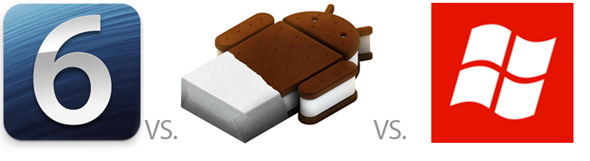
Windows Phone 8 vs iOS 6 vs Android 4.0 ICS – Home Screens Compared & Contrasted


The more we live our lives on our smartphones, the more we are beginning to realize that we spend the vast majority of our time sat looking at whatever home screen adorns our devices. Whether your particular poison is Android, iOS or Windows Phone flavored, the chances are you spend a fair chunk of your time navigating the pile of icons, widgets or tiles that make up your home screen.
Smartphone makers are also beginning to come to the same realization. With the likes of HTC and Samsung customizing the stock Android experience to help differentiate, Google itself improving the stock home screens over the years and Microsoft filling its own home screens with live tiles, it is clear that a simple list of apps just won’t cut it anymore. We’re looking at you, Apple.
Here we take a quick tour of what each of the three major players in the smartphone market deem to be the best home screen solution. Apple’s iOS 6, Google’s Android 4.0 and Microsoft’s shiny new Windows Phone 8 will be the software we look at and it is worth remembering that two of these have yet to be released – anything and everything could change between now and the software being made available to the public. Still, we think it better to compare the latest versions to be shown off, so  there you go.
iOS 6
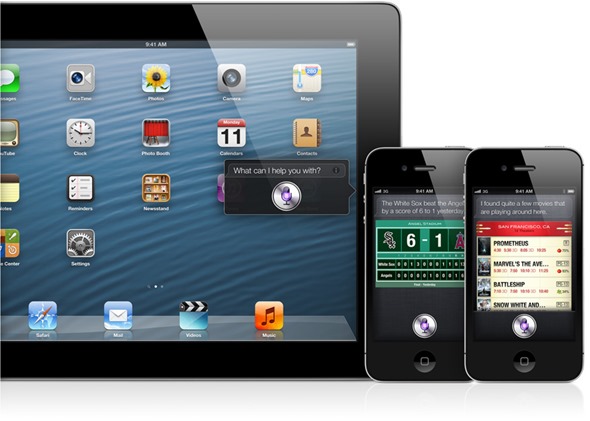
The oldest of the three major smartphone operating systems, iOS is what drives not just Apple’s iPhone, but also its tablet device, the iPad. Whilst iOS is the oldest, it is also one of the most improved since its original inception back in 2007. The home screen though has remained largely unchanged since that time. By largely unchanged, we mean it has remained completely unchanged.
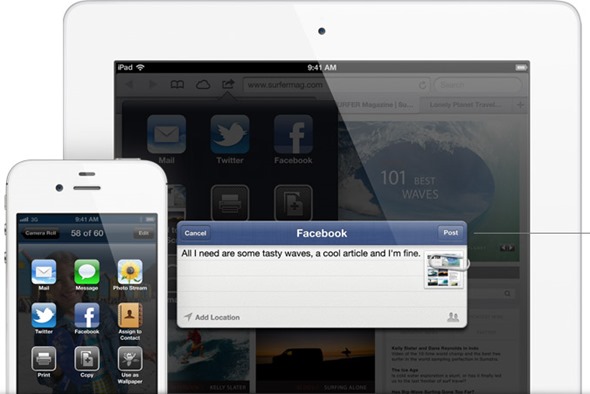
OK, so we’re possibly being a little harsh on Apple’s developers. While it is indeed true that the actual home screen has not changed a great deal in five years, if at all, Apple did add some much needed notification management to iOS 5, and has taken things a step further with the unreleased iOS 6. Similar to Android’s solution, the Notification Center houses all push notifications (should you so wish – they can be turned on and off on a per-app basis) as well as two new buttons. One of these buttons gives users quick access to sending new tweets, while the other, predictably, allows quick status updates to be pushed to Facebook. Keeping your Twitter and Facebook friends apprised of what you are up to is never more than a few taps away.
As far as the actual app launcher is concerned, you’re left with a Dock across the bottom that always shows the same four icons no matter which home screen you are on and a grid of apps above that. Icons can be placed into folders and moved around, should you want to keep all your social networks apps in one place for example.
Apple has been mocked for its lack of willingness to change the way iOS looks and feels over the years, with some important updates missing amongst the ones that have arrived. With Windows Phone 8 very much ‘alive’ with real-time updates and colorful icons, iOS is arguably beginning to look a little dated. It isn’t harming sales, though, and for all its whiz-bang showmanship, Windows Phone isn’t exactly selling by the truck load, is it?
Android 4.x Ice Cream Sandwich
With the next version of Android set to be called Jelly Bean and announced at the upcoming Google I/O event, Ice Cream Sandwich may soon be yesterday’s news, but until then this is the newest, shiniest version of Android there is. Not that many people have it, as the Android version number by user percentages like to show. Still, if you’ve got it, it’s pretty sweet depending on what skin is sat on top of it.
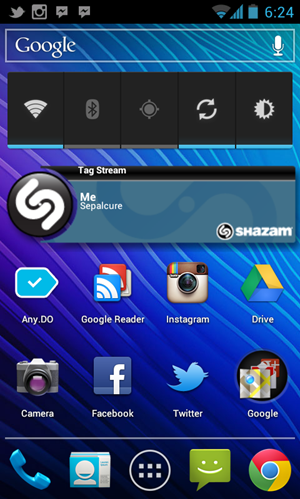
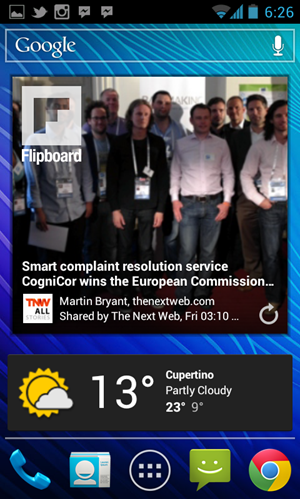
Similar to iOS, Android sports a collection of home screens which can be home to a collection of icons, all pointing to an app. Where Android differs though is the ability to add widgets to that homes screen. You can have clocks, weather notifications and the like, as well as quick access to your social media streams or music controls. There really is a plethora of widgets out there, and the chances are you’ll find one to suit your needs.
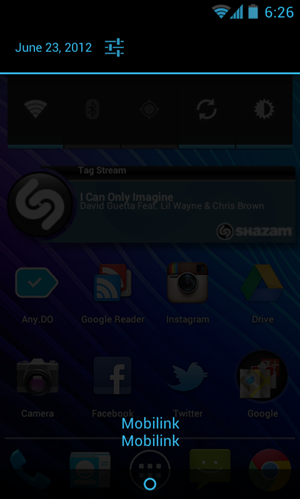
Just like iOS – in fact, Android did it first – Android features a pull-down drawer that plays host to all your notifications. They may be handled slightly different to iOS, and they certainly do not offer the same granular control as Apple’s implementation, but they work.
Icon arrangement can depend on the skin you happen to have installed on your smartphone of choice, with some allowing more icons and widgets on-screen than others. Being able to install different launchers, though, means Android phone owners have the power to customize almost every facet of their home screen experience. Not something that either iOS or Windows Phone owners can say.
Windows Phone 8
Something of an unknown quantity, Windows Phone 8 is the update to the Windows Phone platform that is still waiting to take off. That failure to launch is evident despite Finnish giant Nokia throwing all its chips behind Microsoft and then putting out some pretty impressive hardware to back it up. Microsoft, and Nokia, are hoping that Windows Phone 8 will be a hit.
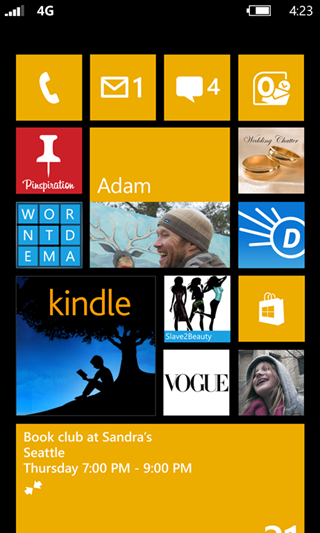
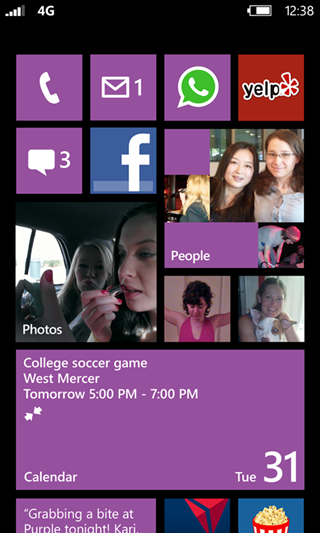
As far as the home screen experience is concerned, Windows Phone 8 is set to be the most ‘live’ experience to date. With Live Tiles constantly updating to reflect statuses rather than simply being dumb icons, users can have constantly updating data right on their home screen. Windows Phone 8 adds the ability to move and resize Live Tiles, meaning that users can choose to have one massive tile that displays recent emails, for example, meaning they don’t need to launch an app just to read the latest addition to their inbox.
The whole Live Tile experience lends Windows Phone something of an ‘online’ feel. The handset almost feels alive because the home screen is constantly updating with new data, new colors and fancy images. It can be a little busy at times, but you pays your money, you takes your choice.
Wrap-up
Which home screen is for you will probably depend on which platform happens to be your favorite. Choosing Android, iOS or Windows Phone based on just the home screen is impossible, as it is the app ecosystem, the hardware and the community support that makes a smartphone platform what it is. Icons on a screen sure do help, though, and if we could combine all three into one then we would be onto a winner.
Until then, carrying three phones around is the only way to be sure!

If U Like This Post Or U Need Any Help In Customization Of Ur Apple Or Android Devices Than Contact Us On Our FB Page....And Also Make Sure To Like It....


Android 4.1 Jelly Bean Confirmed


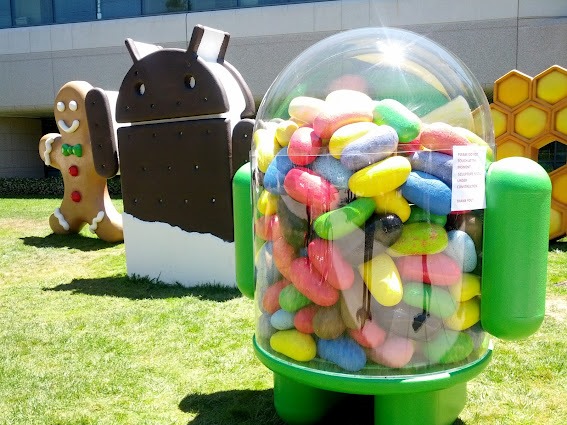
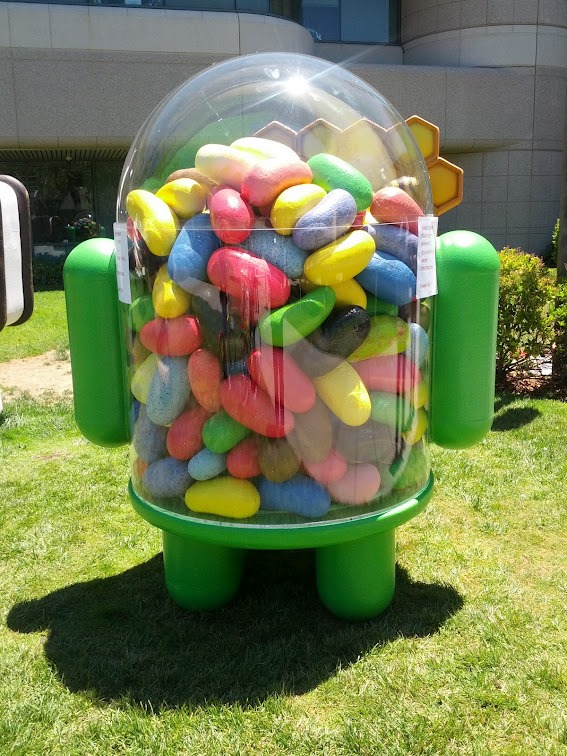
Whenever you talk about or think of Google Android, sugary and delicious snacks are the first things which come to our minds. The multinational corporation has spread its wings wide with the products and services that they offer around the globe, but will almost always be thought of predominantly as the world’s largest search engine. However, if you happen to be from out of town and walked past Google’s Mountain View Campus, you might be forgiven for having your dentist on standby as you stare at the range of irresistible treats that are on display.

The company behind the Android mobile operating system obviously have a seriously strong sweet tooth, with each new version of the OS being named after a sickeningly sweet dessert but it also seems that they are a sucker for keeping in line a tradition they initially created that involves erecting a giant ode to each new treat outside of building number 44 at the Mountain View Campus. Although we are soon expecting the announcement of Android 4.1, the tradition is dated back to the Cupcake 1.5 version of Android and judging by the images, is still going strong.
The latest addition to the lawn-based monuments comes at a perfect time considering the annual Google I/O conference kicks off tomorrow at the Moscone Center in San Francisco. Developers and engineers from all over the world will descend to California to discuss all things new and emerging in the technology world, with the announcement of Android 4.1 expected to feature heavily during the opening keynote presentation at the event. As is always the case, the keynote presentation will open the event with the I/O schedule also showing that a discussion about all things new in Android will follow straight after, a place where Android Jelly Bean will be greatly discussed.
Apart from Android 4.1 Jelly Bean itself, we’re expecting a lot from Google this time around at their I/O keynote. We’re sure Google will announce a bunch of new APIs for developers to crave on, and apart from that, we’re also hoping that Google will also announce something regarding to the quality of apps being developed. But that’s just our guess. Make sure to tune in tomorrow for all of the news coming from Google I/O.

(source Google+)

New SIM Card Standard Approved


A new SIM card standard was recently announced by the European Telecommunications Standards Institute (ETSI). The new SIM card (formally known as Subscriber Identification Module) will be smaller but packaged and distributed the way that ensures backward compatibility with older formats.
Our smart phones are packing more and more sensors and modules than ever before. The space is limited in that little box of yours. The manufacturers were good at decreasing the size of the printed circuit boards and sensors and combining modules onto one or two processors so they can include even greater amount of goodness in those little machines, but they are running of space as well. You can't sacrifice the battery, you can't sacrifice antennas, the touch screen is out of question, and the sensors help conserve the battery life as much as it is possible and make interaction with the phone meaningful. However, what can be touched is the memory card and SIM card slots.
At first developers were removing the memory card slots. This measure was quite unpopular with the users. Current generation of smart phones include a micro-SD card slot, but they now hold a smaller SIM card also. SIM cards are what makes your phone usable on your provider's network. It carries an identification information of your subscription and includes a couple of bytes for storage (Short Message Service messages (SMS) or some phone book entries could be saved on the card). But that's insane – a rather big card that can't compare with functionality with other similar sized cards inside the phone. So it was time to change it – to make it smarter or make it smaller.
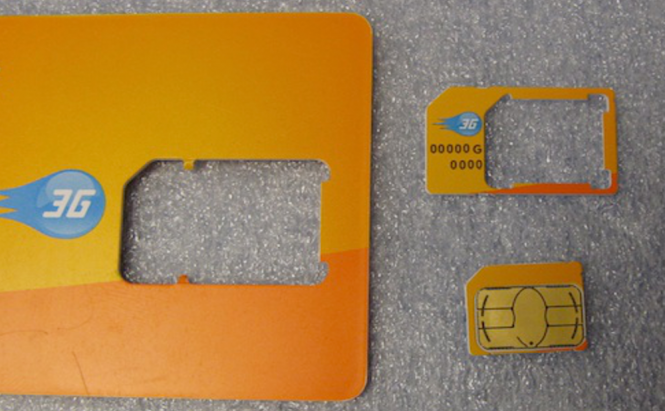
A few large cellular phone manufacturers gathered together at the ETSI to discuss the new form-factor of SIM cards and with some minor arguments that largely went unnoticed agreed upon the design proposed by Apple, Inc. Therefore we currently have four form-factors for the card: Full-size (the size of a credit card) is usually used to deliver the SIM card to a subscriber, a smaller part of it can be pushed out, which is Mini-SIM (if you think of a SIM card, you will more likely imagine this size). Finally, a couple of years ago Apple released iPads that required a Micro-SIM cards, which are half of the standard size of the card. And finally, the new format of the card will be just a tit smaller than the current smaller card. Here we've got all 4 formats covered. The new card will be backward compatible and more likely will be packaged with adapters. This is going to be quite similar to some microSD cards that come with a standard size SD card adapter that you can use on your computer. So with acceptance of the new format, nothing really will change for us, consumers, but the manufacturers will have even more space to include even greater number of modules and sensors. I wish they actually increased the battery a little bit, though.

The New Internet on June 6th, 2012


Ladies and Gentleman, on June 6th 2012 the Internet became larger. I am talking about the new version of the Internet Protocol – IPv6, which raises the 4.3 trillion addresses to the new 340 trillion trillion trillion combinations limit.
In short, the current addressing system exhausted itself in 2011, when the last address block was assigned to the Regional Internet Registries. Meaning the network couldn’t grow anymore without some drastic and expensive changes to it. With time it was obvious that the redesign of the Internet Protocol was necessary. The new protocol would extend the number of address combinations, as well as, add various improvements to increase efficiency and cut some of the costs associated with maintaining the network. The protocol was created and adapted but its implementation means that the software and hardware upgrades must also be made, which is quite expensive and in some cases impossible. However, the good news is that those upgrades can be done over an extended period of time. The new version of the protocol, which was appropriately named IPv6 (the current version is IPv4, while the 5th version was experimental) will run alongside the current version of the Internet Protocol making the switch virtually invisible to a regular user of the Internet, at least at the begging. Down the road, every single device connected to the Internet will have to be switched to the new protocol but it won’t happen overnight as it might take at least a decade to accomplish such task.
Back in June of 2011 a few major Internet giants tried out the new protocol on their servers for 24 hours to test for the switch, and as there were no major problems, on June 6th of this year those companies became the first companies to have their servers among the first machines to join the expanded, new Internet. Overtime the number of large organizations, including your Internet Service Providers, will upgrade their hardware and services in order to join the new network and to stay online. You might also need to get a new router or upgrade your operating system on your computer to the one that supports IPv6 (Windows Vista and 7 support the new protocol). To know more, simply search Wikipedia for “Internet Protocol” or for a quick and fun way to understand this problem check out The TCP/IP Guide: IPv6 Address Size and Address Space. I hope you will enjoy it.

The Google Map's Next Dimension


The “next dimension” in Google Maps has recently been announced by Google. Well, on June 6th to be precise. This announcement is a direct competition with Bing maps by Microsoft and, as many analysts speculate, a hit to improved maps from Apple for their iDevices.
Do you remember how awesome it was to explore the planet using Google Earth? Flying from one point on the planet to another in just matter of seconds. Zooming in some areas and exploring your location in relation to some other locations? Pinning places you've visited on this awesome perfectly rounded globe? Then everything has gotten even better – you could zoom in so much that streets revealed themselves. Unbelievable amount of detail and information is presented itself. Now, before going to an interview in an unknown location, you could preview the street and look like you know what you are doing, while being extremely nervous inside. But Google did not stop there.
I assume it took a few years to collect all the neccessary data for 3D maps of some cities. A squad of planes outfitted with high definition cameras were sent to fly over some big cities to take lots and lots of pictures. A myriad of images taken at 45 degree angle then were put together to comprise a 3D module of a location on a computer. As a result of this tedious work, you can now fly over some cities right at your computer's screen without needing to go anywhere. What it means is that now turn-by-turn directions can be previewed before your actual travel to a new place but this time you will fly over your trip as close to reality as it has never been possible before. Check out this article's image on top to see how realistic the view of Manhattan is. In the near future, those maps should be available for download for your navigators and phones, giving you the mobile freedom for your future explorations.
Along with such new and exciting feature (by the way, all other competitors are catching up with this idea as well) there were some enhancements made to the current maps. The mobile phones will soon feature offline caching of the maps. Currently, the cached map area can only be accessed when there is access to the Internet. All it does it saves your 3G or 4G traffic by using the cache to load pre-saved area of the map. The new feature will allow you to access the maps without need to access the Internet at all. This is a great news for frequent travelers or campers like me. It is rather hard to find an Internet connection in a wilderness.
Google did not say when these new features will be available, which means the company announced the news to only beat Apple to it. However, the previews looked great and their healthy competition is rather a good thing for us, consumers, don't you think?!

Is Facebook Planning to Challenge Google's Position?


Facebook seems to have finally learned one very important thing: learning is good. The offline ads they rolled out on Zynga.com provoked no backlash among privacy-conscious users as would have been the case a couple of years ago. Zuckerberg's team has taken its previous mistakes into account. Now it can start making more space for the general offensive against Google.
The coming of Facebook to Zynga.com is a harbinger of a whole new era in Web advertising. For a regular user like most of us, it is no big deal. A couple of Facebook-styled ads at the right side of your page won't drastically change your Internet experience. At the same time, in the great scheme of things, it is a first sign that the social Web empire has not abandoned its offsite ambitions, and very soon we may witness the birth of a new ad empire, which has all the chances to dismiss Google.
The news about Facebook ads migrating to Zynga.com came two days ago and gave Facebook share prices a 4.3% boost up to USD $33.28. Unlike most other things regarding Facebook, this move of the partner companies was met with relatively little fanfare and media attention. Which is not typical for the news about the second most visited site in the world, when Zuckerberg's each and every move is covered in every detail even in the mainstream media.
Moreover, when it comes to public acceptance of changes on Facebook, things tend to happen in a repetitive pattern. First, privacy guards start making a huge noise expressing their profound concerns about this data beast of Facebook having an eye on what is left of our Web privacy. Then, the media start discussing these profound concerns in more detail, giving a brief account of how Facebook, step by step, got to know more and more about its users. The general media moaning is crowned with a deep woesome sigh and a deplorable bottom line: 'It is so sad... But we can hardly do anything.' What happens next is that in about a month 99.5% of general users forget their privacy is now being abused in a new fancy way, the public outcry fades out somewhere in the tech media headlines and 835 million of jolly Facebook users snatch at what Zuckerberg has to offer them this time.
However, the recent move by the social networking juggernaut was somewhat of a combo breaker, as the regular pattern has not been followed this time. Facebook rolled out an offsite advertising, making extensive use of our personal data, and... nothing happened. No outcry, no privacy guards' big watery eyes, no angry European students suing Mark and Co, nothing. Why?
Because Facebook has finally grasped its usual 'bull-in-a-china-shop' strategy will not always work, that someday it will eventually fail and the company will face dire consequences. Instead, it has adopted a more cautious way of acting, starting the offsite advertising from its closest partner's own website. Most likely, Zynga.com will be followed by several trusted and well-known sites before Facebook finally dares to step out into the seething Web, starting a full-scale war with Google. So, what shall we users do? Well... relax and start buying up popcorn!

Picture Credit: Anna Rettberg

 
iLover © 2012 | Designed by LogosDatabase.com, in collaboration with Credit Card Machines, Corporate Headquarters and Motivational Quotes